Turn a PDF or your notes into a course
Upload the file you already teach from. Claro reads it, proposes a course plan, and builds narrated lessons with questions your learners answer along the way. You see the plan before anything gets built.
Updated 2026-11-01.
What you can upload
- Word (.docx)
- Plain text or Markdown, so notes typed anywhere work
- Images: PNG, JPG, WebP
- Links to web pages
Up to 50 MB per file, and you can add several files to one course.
What happens to your file
- Claro checks what the course is about. If the file doesn't make the subject clear, it asks you instead of guessing.
- It writes a course plan: modules, lessons and what each lesson should teach. By default it also searches the web for current practice on the subject. If the course has to match your document exactly, a company policy for example, tell it to use only your file.
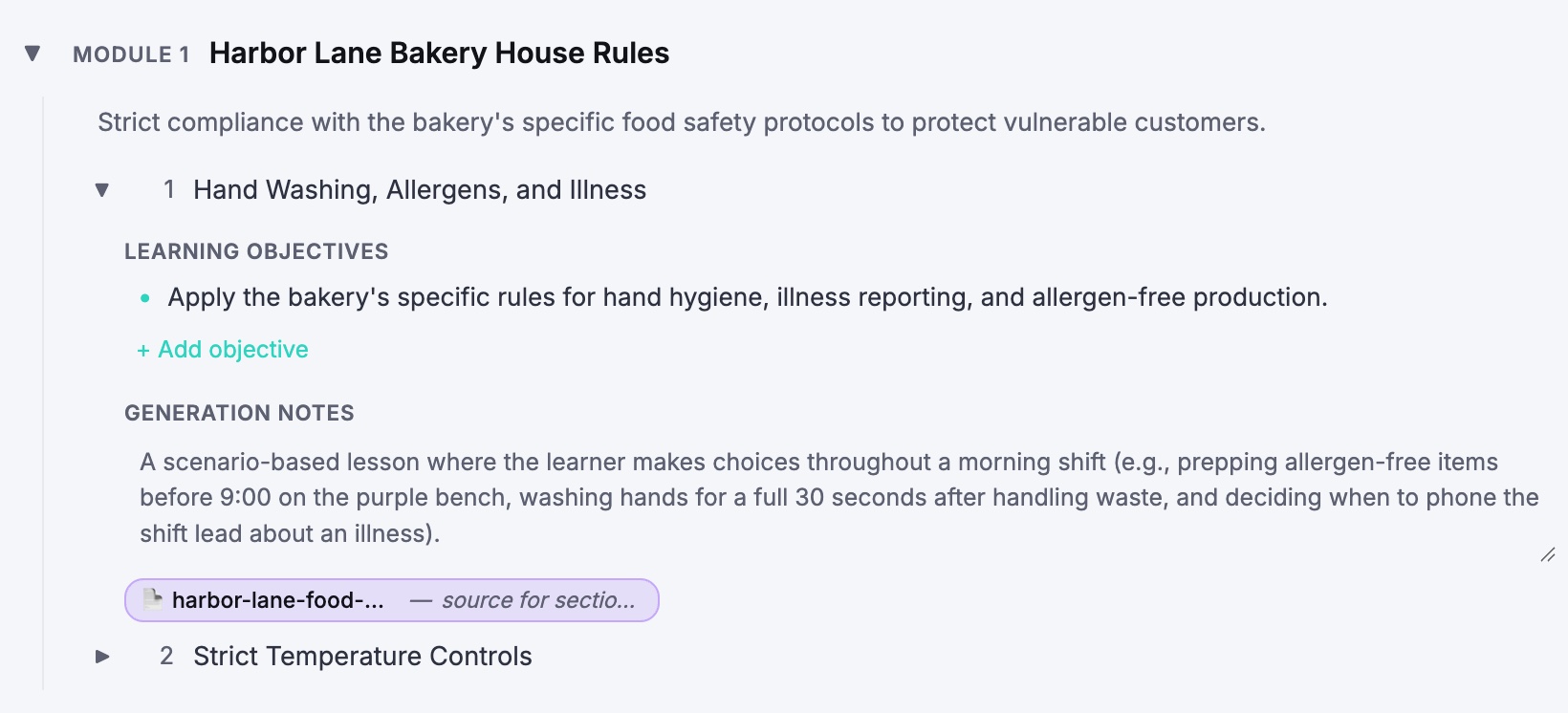
- Each lesson shows where it comes from. In the outline, a lesson carries a chip for the file it draws on, with a note on what it takes from it. The lesson text then cites your file by name.
- You edit the plan, then Claro builds it. Rename lessons, reorder them, cut what you don't need. Then it writes the narration and builds the slides and questions.
What the course includes
On every plan, free included:
- Narration synced to animated slides
- Quizzes, open questions, role plays and simulations inside the lessons
- An AI tutor: learners ask about the slide they're on, typed or spoken, and get an answer
- Subtitles and progress tracking, for any number of learners
On Pro ($39/month) you also get a share link, SCORM and xAPI export for your LMS, and translation of the whole course into 70+ languages, narration included.
Questions
How big can the file be?
50 MB per file.
Will the course stick to my document?
Each lesson is tied to the file it draws on and cites it. By default Claro also checks the web for current practice, which helps on a general subject. For a policy, or anything that has to match the source, tell it to use only your file. See compliance training.
Does it work with scanned PDFs?
Yes. We tested a one-page scan with no text layer, a teacher's handout on adding fractions. Claro picked out the topic, the teacher and the year group, then asked what the course should help students do.
Can I write my own notes instead of uploading a file?
Yes. Paste or type them as text, or upload a .txt or Markdown file.
Can I put the course in my LMS?
Yes, on Pro or Team. Export it as a SCORM or xAPI package and upload it to your LMS.
Can I do this from ChatGPT or Claude?
Yes, on the Team plan. Connect Claro's MCP server and hand it the document from the chat. Setup is on the MCP page.
Is it free?
Your first 3 courses are free, built from your own documents. Pro is $39/month for 5 new courses a month.